Skip to content

fuseraft

Chat in your terminal. Scale into multi-agent pipelines when one agent isn't enough.
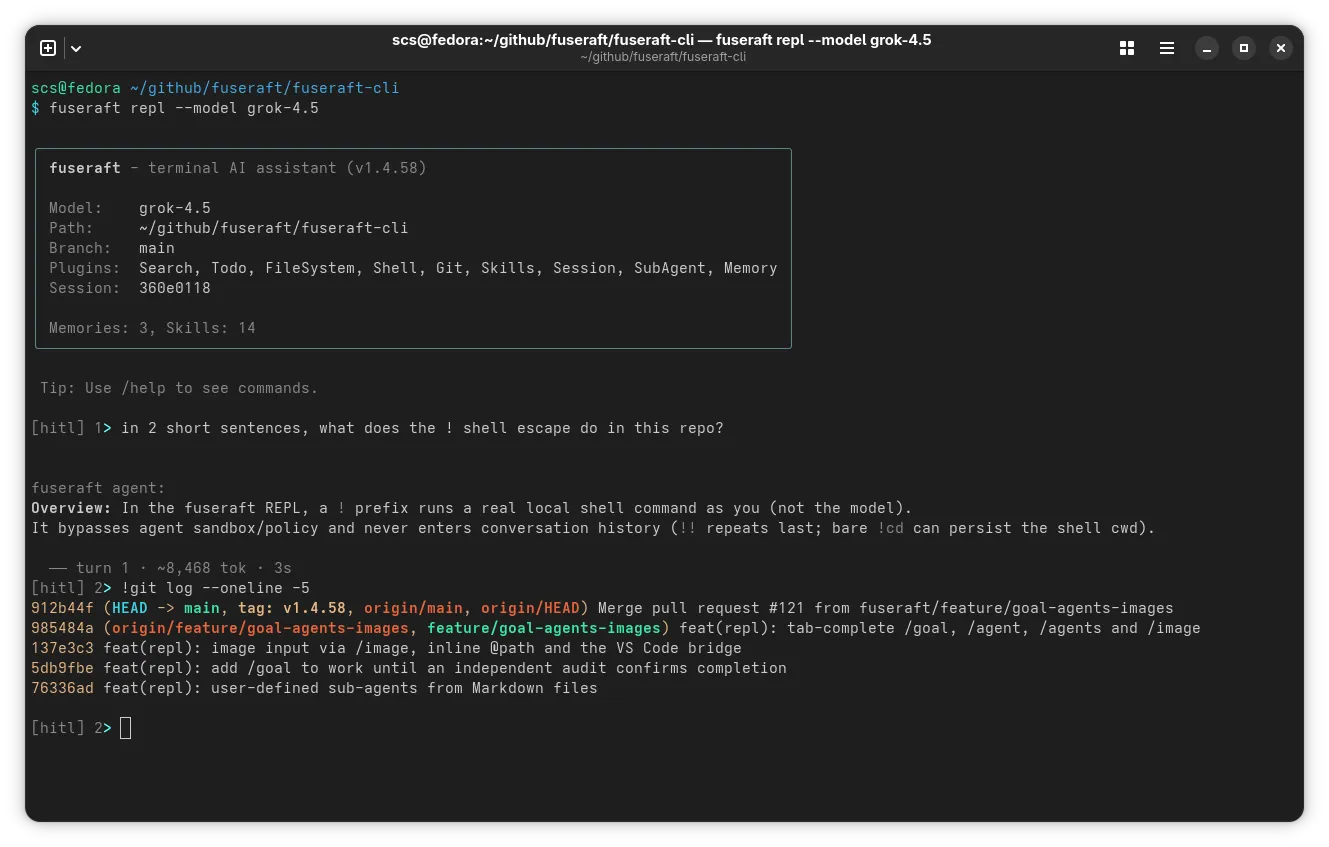
A real fuseraft REPL session: asking the agent what the !<command> shell escape does, then using it to run git log directly

Run fuseraft and start chatting with a model that can read and edit files, run shell commands, search your codebase, and use git — no config file needed. When one agent isn’t enough, fuseraft scales into declarative, multi-agent pipelines defined in YAML, where routing validators mechanically enforce that each agent did what it claimed before the pipeline advances. Built on Microsoft Agent Framework.

Terminal AI assistant

fuseraft repl is an interactive chat session with a single model — safe by default (HITL approval, filesystem/shell/git sandbox), resumable, with ~50 slash commands and a !<command> shell escape for running things yourself without leaving the chat.

REPL →

Agent teams as YAML

Define each agent’s name, model, system prompt, and plugins in a single YAML config. The coordinator routes work between them automatically.

Configuration →

Model-agnostic

Mix frontier LLMs and local SLMs per agent in the same team — Anthropic, OpenAI, Google, Mistral, xAI, DeepSeek, Azure OpenAI, or any model served through Ollama. Rotate API keys automatically on rate limits.

Models & Providers →

Rich plugin ecosystem

Every agent can call filesystem, shell, git, HTTP, JSON, search, and Docker sandbox tools out of the box. Connect any external MCP server.

Plugins →

Resilient sessions

Sessions checkpoint after every turn. Interrupt anytime and resume exactly where you left off — no work is lost.

Sessions →

Spec-driven development

Use --spec to anchor the team to an agreed specification before implementation begins. Routing validators block handoffs until evidence is present.

Spec-Driven Development →

Governance & cost control

Track token usage and estimated cost per turn. Enforce hard spending caps. Apply execution rings, prompt injection detection, and a hash-chain audit log.

Governance →

Terminal window
curl -fsSL https://raw.githubusercontent.com/fuseraft/fuseraft-cli/main/install.sh | bash

Then run the setup wizard on first launch:

fuseraft
No configuration found at ~/.fuseraft/config
Provider setup
Configure your provider and API key, then pick a model.
Provider URL (http://localhost:11434): https://api.anthropic.com
API Key (leave blank for Ollama): ••••••••
Model (2 available from https://api.anthropic.com)
> claude-sonnet-4-6
claude-opus-4-6
>

That’s it — you’re chatting, with file, shell, search, and git tools already available.

When one agent isn’t enough, generate a team config and run a multi-agent pipeline instead:

Terminal window
fuseraft init
fuseraft run -c .fuseraft/config/orchestration.yaml "Add a hello-world endpoint to this project"

Full installation guide · REPL walkthrough

Doc What it covers
Getting Started Prerequisites, installation, first run
REPL Interactive terminal chat — tools, safety model, ! shell escape, skills, sessions
Writing Effective Tasks Task descriptions that produce correct, verifiable results
Spec-Driven Development Using --spec to anchor agents before implementation begins
CLI Reference All commands and flags
Scripting & Automation Running fuseraft from bash/Python, --json output, event-driven pipelines
Configuration Full config schema (YAML and JSON)
Models & Providers Model configuration and auto-detection
Plugins All built-in tools agents can call
Strategies Selection and termination strategies
Routing Validators Anti-hallucination handoff guards
Harness Engineering Building configs that enforce correctness mechanically
MCP Integration Connecting external MCP servers
Security & Sandbox File and network containment
Governance Execution rings, audit log, circuit breaker, SLO tracking
Evals Running agent teams against scored test cases; CI integration
Sessions Resumption, HITL, cost tracking, compaction
Context Management How fuseraft manages context across a long session
Context Store Importing reference material for agents
Knowledge Layer ADRs, graph, provenance
Skills Portable skill packages and cross-session skill index
Examples Ready-to-use config examples
Design Architecture, layer map, MAF usage, and decision log

The Fuseraft VS Code extension brings the CLI into your editor — run tasks, browse sessions, validate configs, and get YAML/JSON IntelliSense, all from the activity bar.